Falkon Connect: Architecting a XMPP & WebXDC Bridge from Scratch
Computers and networks are faster than ever, yet modern communication software is increasingly bloated, centralized, and locked behind walled gardens like WhatsApp, Slack, or Discord. These platforms dictate how we communicate, what data they harvest, and which clients we are allowed to use.
I wanted to change that for the KDE ecosystem.
As part of my Season of KDE 2026 project—under the guidance of my mentors Benson Muite, Schimon Jehudah, and Juraj Oravec, I set out to build Falkon Connect. This blog documents the steps taken to build it.
The vision was ambitious but clear:
- The Communicator: Transform the Falkon Browser into a lightweight, fully functional, decentralized XMPP desktop client.
- The Platform: Integrate WebXDC support, allowing users to load and run containerized, interactive web applications directly within their chat sessions without relying on external servers.
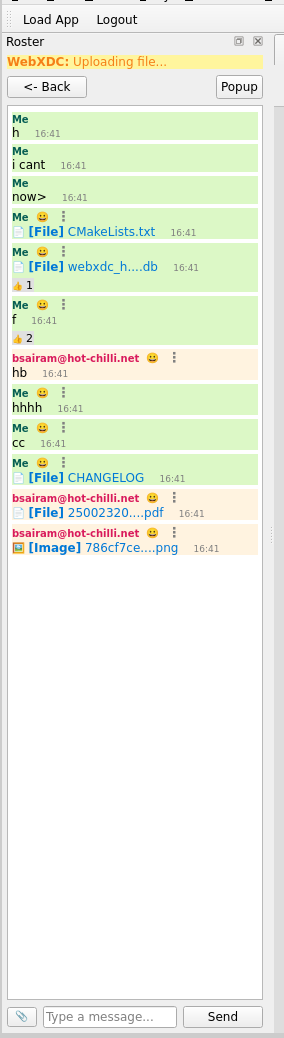 Caption: The Falkon Connect interface, running natively inside the browser sidebar as a dock widget.
Phase 1: The Foundation & The WebXDC Loader (Week 1)
Before sending a single message over the internet, I had to establish the local environment. Falkon is built using C++ and the Qt framework. Writing an extension requires a delicate dance between Falkon’s native UI threads and the Python environment where our logic resides.
Bridging Python and C++/Qt
I started by setting up the initial development environment for Falkon extensions. This involved understanding how Falkon parses Python plugins, registers them in its internal extension manager, and allocates UI space. I designed the basic UI structure to be unobtrusive: a simple toolbar button that toggles a QDockWidget acting as the application’s sidebar interface.
Architecting the WebXDC Loader
The core requirement of this project was WebXDC support. WebXDC applications are essentially zipped packages (.xdc files) containing HTML, CSS, JavaScript, and a specific API payload.
I engineered the .xdc Loader to handle the complete lifecycle of these applications:
- Ingestion: Created a “Load App” function utilizing
QFileDialog, allowing users to select a local.xdcfile. - Extraction: Wrote secure logic to handle the
.xdcarchives, extracting their contents into temporary location on the user’s local machine. - Rendering: Integrated Qt’s
QWebEngineViewto point to the extractedindex.html.
Falkon now could natively launch and run containerized WebXDC applications directly in the sidebar.
Phase 2: The XMPP Transport Layer (Weeks 2-3)
With the containerized environment ready, the users needed a way to communicate. I chose XMPP (Extensible Messaging and Presence Protocol) for its decentralized nature, maturity, and extensibility.
To handle the heavy lifting, I integrated Python’s Slixmpp library. However, this presented an architectural challenge.
The Inter-Process Communication (IPC) Hurdle
Slixmpp is an asynchronous, event-driven library built on Python’s asyncio. Falkon’s Qt UI, however, relies on a synchronous event loop. If I ran Slixmpp directly on the main Qt thread, the entire browser would freeze the moment it waited for a network packet.
The solution was a robust Inter-Process Communication (IPC) architecture using QProcess.
- The Frontend: The PyQt/PySide GUI handles user inputs and database queries on the main thread.
- The Backend: A headless Python script (
xmpp_worker.py) runs theSlixmppdaemon in an isolated background process.
They communicate entirely via stdin and stdout. For example, when a user sends a message, Qt pushes SEND:jid@domain.com:msg_id:Hello into the pipeline. When the worker receives a network packet, it prints MSG:jid@domain.com:msg_id:Hello back to Qt.
Establishing the Network
Once the IPC bridge was stable, the network came to life:
- Zero-Latency 1-to-1 Chat: Established a stable, bidirectional connection.
- Message Carbons (XEP-0280): A modern chat experience requires multi-device synchronization. I implemented XEP-0280 so that if a user sends a message from their mobile phone, the Falkon extension instantly receives a “carbon copy” and updates the local UI.
- Tabbed UI & Notifications: Engineered a frontend tabbed interface to allow seamless switching between active conversations, accompanied by system-level desktop notifications for incoming messages.
- The First Database: Designed a foundational SQLite database (
webxdc_history.db) to automatically log all incoming and outgoing messages for offline viewing.
Phase 3: Evolving into a Desktop-Grade Client (Weeks 4-5)
To understand what users expect from a modern messenger, I spent time researching upcoming features by testing various existing XMPP clients (Gajim, Conversations, Dino). It became clear many more features had to be implemented.
Message Manipulation
I expanded the core chat capabilities by implementing standard quality-of-life features:
- Copy & Forward: Allowing users to seamlessly move data between chats.
- Delete for Me: Initially, I implemented a local deletion feature that simply removed the message from the SQLite database and refreshed the UI. (This would later evolve into something much more powerful).
Out of Band File Sharing & Image Rendering (XEP-0363 & XEP-0066)
Handling files is notoriously tricky in XMPP. I integrated XEP-0363 (HTTP File Upload). When a user clicks the attachment icon, the client asks the server for an upload slot, pushes the binary data via HTTPS, and receives a URL.
However, parsing incoming files from other clients was a unique challenge. Mobile clients often send files as “Out of Band” (OOB) data rather than standard message bodies. I wrote a custom XML parser to hunt for <x xmlns="jabber:x:oob"><url>...</url></x> tags.
To keep the Qt UI clean and prevent text-overflow bugs, I implemented a regex-based parser that truncates long filenames (e.g., screenshot_102...png) and renders them as clickable HTML <a> tags with native title attributes for hover tooltips.
Phase 4: Advanced XEPs (Weeks 6-8)
As the project grew, so did its complexity. The most recent phase has been dedicated to massive upgrades to fix edge-case bugs and the implementation of advanced XMPP Extension Protocols (XEPs).
1. The Shared State Problem (Multi-Account SQLite Isolation)
During testing, I discovered a critical “perspective” bug. When logging out of Account A and logging into Account B, messages sent to Account B by Account A were rendering on the right-side (the “Me” side) of the chat bubble.
Because both accounts shared a single webxdc_history.db file, the database had saved those messages with is_me = True during Account A’s session.
The solution was to refactored the backend to dynamically provision isolated databases based on the user’s Bare JID at the moment of login.
# Dynamically generating an isolated database file per account
safe_jid = jid.replace("@", "_").replace(".", "_")
db_filename = os.path.join(plugin_dir, f"history_{safe_jid}.db")

self.db = DataBaseManager(db_filename)
This mirrors the architecture of professional clients, ensuring absolute data privacy and preventing perspective drift across alternate accounts.
2. Message Correction (XEP-0308)
I completely removed the old “Delete for Everyone” hack and replaced it with true Message Correction(Edit Messages).
When a user edits a message, the client doesn’t just send a new message saying “*Correction: …“. It sends a new <message> stanza with a <replace id="original_stanza_id"/> payload. When the Falkon frontend receives the EDIT_RX signal, it executes an UPDATE query on the SQLite database using the original stanza ID, then dynamically clears and re-renders the specific QTextBrowser viewport. The text snaps to the new version instantly without requiring an app restart.
3. Bypassing Filters for Real-Time Reactions (XEP-0444)
One of the most complex features to engineer was emoji reactions. Slixmpp aggressively filters out incoming <message> stanzas that lack a <body> tag. Because XEP-0444 reactions are purely metadata, the worker was silently dropping them.
To solve this, I bypassed the standard message handler entirely and registered a raw XML stream listener using MatchXPath:
# Bypassing the body filter to catch raw XML reactions
self.register_handler(Callback(
    'Reactions',
    MatchXPath('{%s}message/{urn:xmpp:reactions:0}reactions' % self.default_ns),
    self.on_reaction
))
Once intercepted, the data is pushed to a new reactions table in SQLite with a UNIQUE(msg_id, sender, emoji) constraint. When drawing the chat bubbles, the frontend executes a GROUP BY emoji query to render compact reaction pills (e.g., 👍 2) with interactive hover tooltips showing exactly who reacted.
4. Timezones & The Distrobox Trap
A fascinating bug emerged late in development: all timestamps were exactly 5 hours and 30 minutes behind.
Because the plugin runs inside an isolated Linux environment (often a container or Distrobox), the standard Python datetime.now() function failed to locate the host’s TZ environment variables. It defaulted to UTC (Greenwich Mean Time).
Instead of writing a hardcoded +5:30 offset, I bypassed the Python environment entirely and queried the Qt C++ framework, which interfaces directly with the host OS’s hardware clock:
# Bypassing Python's UTC fallback by querying the Qt Framework directly
local_time = QtCore.QDateTime.currentDateTime().toLocalTime()
time_str = local_time.toString("HH:mm")
This accurate timestamp is now baked into the SQLite row the exact second the message is received.
5. Roster Sync and Secure Lifecycles
To round out the client experience, I implemented:
- Full Roster Synchronization: The sidebar dynamically fetches and displays all friends, mapping their online/offline presence to UI indicators, along with a functional “Add Contact” workflow.
- Secure Login Lifecycle: A complete login/logout loop. When a user clicks logout, the plugin gracefully tears down the UI, clears the memory cache, and issues
.kill()to the background worker to safely sever the TCP connection.
What’s Next? The Final Sprint
Falkon Connect has evolved from a simple Python script into a highly capable, multi-threaded communication tool. As we approach the final weeks of the Season of KDE, my focus will shift to two critical areas:
- Secure Credential Storage: Currently, the user must log in manually upon starting the browser. I plan to integrate the OS Keyring (such as KDE KWallet) to securely store and retrieve XMPP credentials natively, providing a seamless auto-login experience.
- Polishing the WebXDC Integration: With the XMPP transport layer fully perfected, the ultimate goal is to connect the WebXDC runner to the chat. This will allow the interactive
.xdcapplications to reliably send and receive their data payloads over the XMPP network, enabling multiplayer games and shared collaborative tools directly inside Falkon.
Building this has been an incredible deep-dive into asynchronous programming, GUI architecture, and network protocols. If you are a Qt developer, a Python enthusiast, or a KDE user, I would love your feedback on the project’s direction!
The source code for Falkon Connect is available on KDE Invent / GitHub.